
How to Assess the UX of a Website: The User Engagement Framework
Improving your website’s user experience isn’t a one-time task. It’s an ongoing process that evolves alongside your business goals.
Looking to understand how you can properly assess the UX of your website? You’ve come to the right place. We specialise in UX and UI improvements, web design and development, and know exactly what will both help and hinder your site from a usability perspective.
The User Engagement Framework: A Holistic Approach
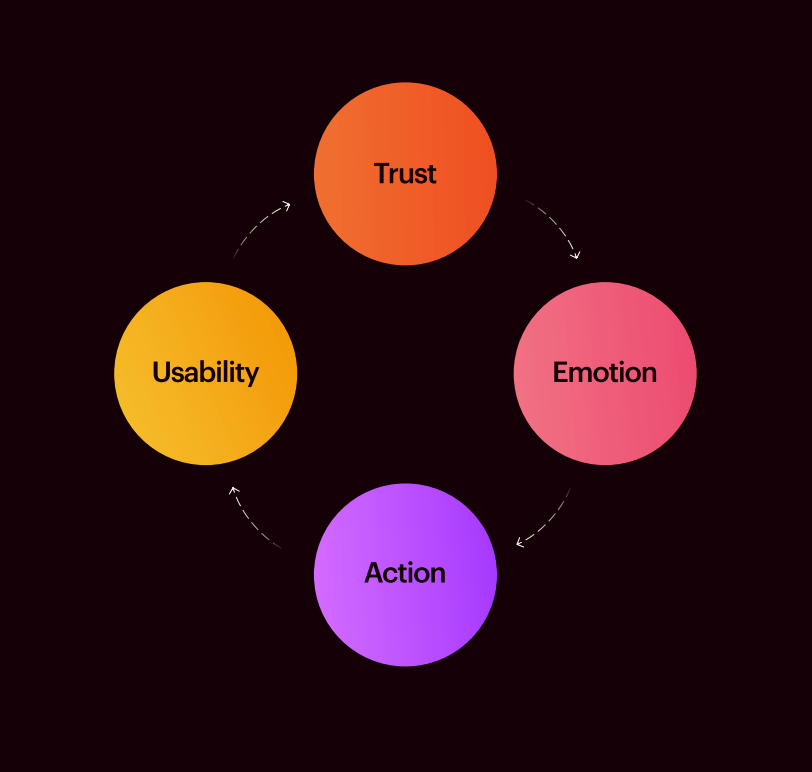
Our approach to assessing and improving user experience isn’t about simply working down a list. The way we do it is circular, because we know that improving your site is a never-ending journey, with no set start or end point.
This framework measures the quality and impact of users’ engagement with the thing they’re engaging with. So, here, we’ll go through everything that we know and explore how to conduct your own UX evaluation.
Prefer to watch a video?
We did a webinar on how to improve the UX of your website.
Usability: The Foundation of User Experience
Usability sits at the core of effective UX design. It focuses on helping users find what they need quickly and easily. When usability is strong, users naturally move through your site without confusion, increasing the chances of conversion.
We love a metaphor here at Dawn. Think of your website as a well-paved road, and your users as travellers. Just as travellers need clear, obstacle-free paths, users need a smooth digital journey.
One of the most important aspects of usability is clarity. Your homepage headline and opening copy should immediately explain what your business does. Visitors shouldn’t have to scroll or search to understand your offering.
In a recent UX review we did for a global client, we started here, advising them that the headline needed to get to the point. It’s the same on landing pages. Get to what you’re trying to say as soon as you can. There’s nothing worse than potential customers thinking, “what is it these guys do?”

Trust: Building Confidence in Your Brand
Trust plays a critical role in whether users choose to engage with your website or leave for a competitor. Users need to trust the reliability of your brand, product and values, and even small details can influence whether a visitor feels confident in your business.
Think of your own experience on a website. No reviews? How do you know it’s legit? Filling in a form with no way of opting out of potentially spammy emails? When something just doesn’t sit right with you, there’s a subliminal feeling that you might not be able to trust this company, and you might move on to the next.
Common trust-building elements include:
- Customer reviews and testimonials
- Clear contact information
- Transparent privacy and data policies
- Professional, consistent design
- Case studies or client logos
Customer reviews, in particular, are powerful. They provide reassurance that others have had positive experiences with your business. Too few reviews can raise doubts, but strategically placed testimonials can significantly improve confidence and conversion rates.

Emotion: Creating Meaningful User Connections
While usability and trust help users navigate and feel confident, emotion helps them connect. To provide a memorable user experience, your website should evoke emotions in users. This can significantly impact customer satisfaction, engagement and the success of your business objectives.
Consistency is the key to creating this emotional connection. Users appreciate consistency in the user interface, experience and content design.
Your headlines, visuals and messaging should all support the same story. Competing messaging or inconsistency between your title, subtitle and content can confuse users. Confusion is not an emotion you want people to be feeling on your site.
In a recent UX review, we focused on aligning a client’s messaging with their brand values, creating a deeper emotional connection with their users and ultimately driving higher engagement.
Action: Turning Engagement Into Results
The ultimate goal of usability, trust and emotion is to encourage action. Whether that’s making a purchase, submitting a form or contacting your team, your website should guide users naturally towards the next step.
One common issue to address in this context is inconsistent calls-to-action (CTAs). The prominence of CTAs should remain consistent across different breakpoints and devices, aligning with your UX design. Users should feel guided, not confused.
Common action-focused improvements include:
- Consistent CTA styling across pages
- Clear next-step messaging
- Mobile-friendly CTA placement
- Reduced friction in forms
- Logical user journey progression
At the end of a user’s action, they’ve either completed their journey, or the engagement framework cycle starts again and the user repeats the cycle.
The Engagement Framework in Action
At Dawn Creative, we use the engagement framework you’ve just read about to conduct in-depth reviews of core pages on a client’s website. By analysing usability, trust, emotion and action across key pages, we identify areas for improvement and opportunities for growth.
Often, it’s not one major issue holding a website back, but several smaller ones. Addressing these collectively can significantly improve performance. UX improvements don’t always require a full redesign. Small, strategic changes can deliver meaningful results.
In a recent UX review, we identified various issues such as inconsistent CTA prominence, content hierarchy challenges and mobile design quirks. By making multiple smaller improvements to the user experience, we drastically improved conversion, performance, load times and the overall user experience for our client’s website.

How to Measure Your Website’s UX
Once you begin improving your UX, it’s important to measure performance and track progress. A combination of data and user feedback provides the most accurate picture of how your website is performing.
Here are seven effective ways to measure your website’s UX:
- Track user interaction with forms
Analytical tools like Hotjar can provide valuable insights into user interactions with forms, helping you identify friction and reduce error rates. - Analyse navigation patterns
Heatmaps can help you understand how users navigate your website, what attracts their attention and which elements they prioritise. - Conduct usability testing
Evaluate and enhance your website’s UX by conducting usability testing, including tasks, observations and analysis. As Kyle Cassidy said in a recent podcast episode with us, make sure you get qualitative data too, rather than just working with numbers. How does it feel when moving along the website journey? This approach is crucial in identifying and rectifying user pain points. - Monitor page views and time on page
Keep a close eye on page views and the time users spend on pages to evaluate how people interact with your content and whether your pages are encouraging further engagement. - Run customer feedback surveys
Conduct surveys to gather user feedback and understand their satisfaction levels, allowing you to make data-driven improvements and enhance the overall experience. - Track page load speed
The speed at which your web pages load is essential for a seamless user experience. Optimising page load speed ensures swift user interactions and lower abandonment rates. Tools such as Google Lighthouse can help you assess performance. Compressing images and removing unnecessary code are good places to start if your pages are loading slowly. - Combine quantitative and qualitative data
Numbers only tell part of the story. Measure your website’s UX through objective metrics such as conversion rates alongside qualitative insights such as user feedback and satisfaction surveys. This gives you a more complete picture of the real user experience.

Key Tools for UX Analysis
In-depth UX analysis requires the use of tools that provide valuable data and insights, helping you understand how users interact with your website.
Tools like Hotjar can be used to understand user interactions, while heatmaps can help analyse navigation patterns and identify areas that attract or lose attention. Surveys can also collect essential feedback directly from users.
Google Lighthouse is another useful tool for assessing performance, accessibility, best practices and SEO.
UX Is a Continuous Journey
Improving your website’s UX isn’t about reaching a finish line. It’s an ongoing process of refinement, learning and optimisation. As your business grows and user behaviour changes, your website should evolve too.
At Dawn, we love anything that can squeeze even 1 percent more out of your website. Let us help you figure out how you can make the changes that make your users’ experience better, help them trust your company and avoid that feeling of annoyance when things just don’t work perfectly.
Ready to take the next step? Start with a professional UX review to uncover opportunities, streamline user journeys and boost engagement and conversions.
Visit our Web Review page to get started today.